MSL Rover NX CAD model
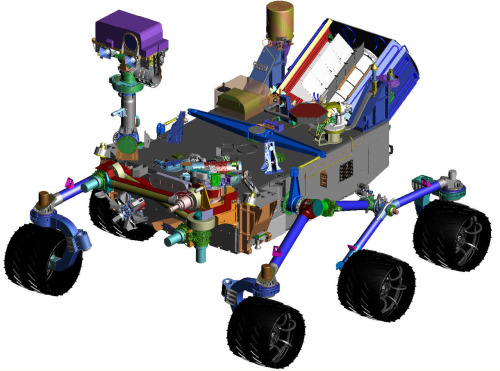
You’ve all seen the artist renditions. This is what Curiosity looks like to an engineer.
A few minutes into our interview last Thursday, I ask Tim Nichols, managing director of Global Aerospace, Defenses and Marine Industries at Siemens, if he was nervous about the Curiosity’s fate on Sunday. “Of course I am,” he says with a laugh, “We all know about missions to Mars — they’re complex.” None moreso than Curiosity’s elaborate landing sequence, designed to get the SUV-sized robot down safely.
He needn’t have worried. Late Sunday night, the rover successfully set down on the Martian landscape, overseen by a tense room of Jet Propulsion Laboratory (JPL) engineers and watched by so many people here on Earth that all of NASA’s websites crashed. Like the rest of us, Nichols was glued to his screen. Unlike the rest of us, Nichols gets to say he had a hand in it. His company’s software designed Curiosity.
Curiosity is much larger than her unexpectedly long-lived predecessors, Spirit and Opportunity. This meant that she couldn’t just land bundled inside airbags like the smaller rovers.
Instead, the mission executed a complex series of maneuvers to eject the robot from its capsule and lower it to the ground, via a rocket-powered sky crane in a sequence of events that NASA called the Seven Minutes of Terror.
Curiosity was designed by the JPL at the California Institute of Technology. When it came time to coordinate the enormous team of designers and engineers that built Curiosity, the capsule, and the sky crane, JPL turned to Siemens. They needed to design the robot (relatively) cheaply and they needed to design it fast — the launch window for missions to Mars comes once every two years. If you miss the deadline, there’s a long wait ahead.
MSL Capsule with Rover NX CAE thermal model
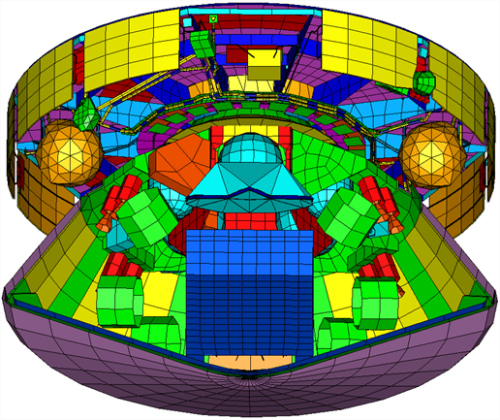
If you squint, you can see Curiosity and the sky crane folded up together in the capsule.
Luckily, Siemens had developed software suited to this sort of project. They call it Product Lifecycle Management (PLM).
One of the costliest parts of creating a new physical product is building and testing prototypes. With PLM’s robust suite of simulators and version tracking, you can avoid a lot of physical prototyping — saving both time and money, and speeding up the development process. In essence, PLM turns the physical engineering of a product into a process that looks more and more like designing code.
PLM runs on a laptop, connected to a central asset manager, called the Team Center. Engineers can check out parts of the project, work on their problems and assignments, and then check it back in to the main branch. This allows for a lot of concurrent design work. “In the past, engineering teams would be somewhat isolated by discipline,” says Nichols, “The overall leadership recognized that they needed to bring all the groups together.”
This is a far cry from past projects, which would be designed as a series of handoffs between teams. First the thermal profiles would be worked out, then the aerodynamics, on down the line. Propagating changes between teams could become a nightmare. PLM changed all of that, Nichols says, giving the team the ability to “compress the schedule and … do many more design iterations.”
MSL NX CAD Exploded view of seperation stages
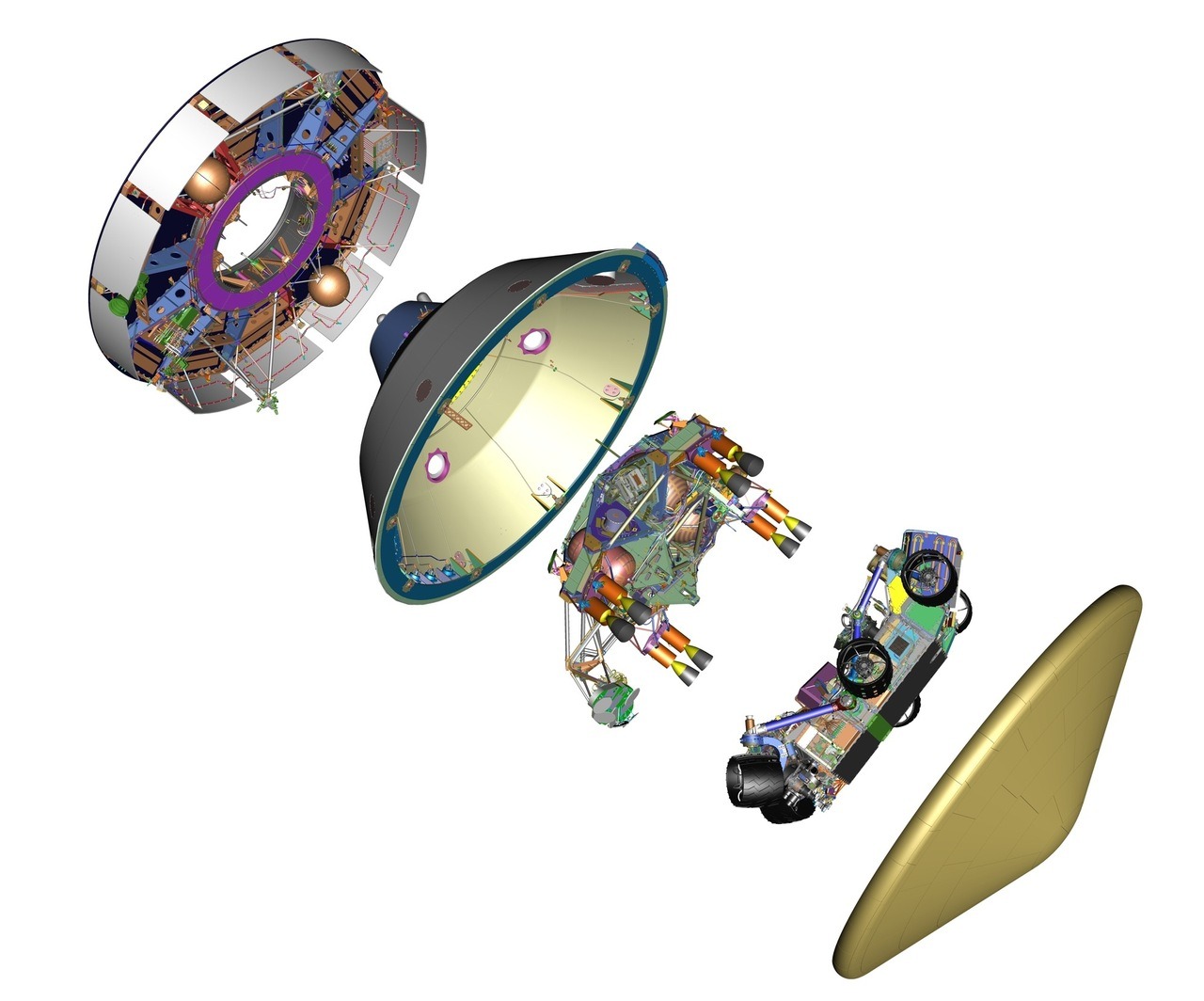
With luck, this is the only exploded view of the Mars lander that we’ll ever see.
If this sounds a lot like software engineering, especially the open source variety, it’s because it is. There’s a version control system, the ability to check code in and out of the system, and a set of test suites that allow you check the performance of your part of the module in relation to the whole. By keeping the objects in software for as long as possible, you can treat them like software, with all of the speed and flexibility that this implies.
Nichols says their suite of tools has been used to design everything from golf clubs — “Golf clubs are pretty sophisticated, though they haven’t helped my game.” — to aircraft carriers. Looking ahead, he predicts an increasing incidence of distributed international teams of contributors working on a project.
“Global virtual collaboration and engineering is really the future,” he says. “We want to see more of that.”
But first, Curiosity had to make it to Mars. “We all have our fingers crossed,” he said on Thursday. You can uncross them now, Mr Nichols.
You’ve all seen the artist renditions. This is what Curiosity looks like to an engineer.
A few minutes into our interview last Thursday, I ask Tim Nichols, managing director of Global Aerospace, Defenses and Marine Industries at Siemens, if he was nervous about the Curiosity’s fate on Sunday. “Of course I am,” he says with a laugh, “We all know about missions to Mars — they’re complex.” None moreso than Curiosity’s elaborate landing sequence, designed to get the SUV-sized robot down safely.
He needn’t have worried. Late Sunday night, the rover successfully set down on the Martian landscape, overseen by a tense room of Jet Propulsion Laboratory (JPL) engineers and watched by so many people here on Earth that all of NASA’s websites crashed. Like the rest of us, Nichols was glued to his screen. Unlike the rest of us, Nichols gets to say he had a hand in it. His company’s software designed Curiosity.
Curiosity is much larger than her unexpectedly long-lived predecessors, Spirit and Opportunity. This meant that she couldn’t just land bundled inside airbags like the smaller rovers.
Instead, the mission executed a complex series of maneuvers to eject the robot from its capsule and lower it to the ground, via a rocket-powered sky crane in a sequence of events that NASA called the Seven Minutes of Terror.
Curiosity was designed by the JPL at the California Institute of Technology. When it came time to coordinate the enormous team of designers and engineers that built Curiosity, the capsule, and the sky crane, JPL turned to Siemens. They needed to design the robot (relatively) cheaply and they needed to design it fast — the launch window for missions to Mars comes once every two years. If you miss the deadline, there’s a long wait ahead.
MSL Capsule with Rover NX CAE thermal model
If you squint, you can see Curiosity and the sky crane folded up together in the capsule.
Luckily, Siemens had developed software suited to this sort of project. They call it Product Lifecycle Management (PLM).
One of the costliest parts of creating a new physical product is building and testing prototypes. With PLM’s robust suite of simulators and version tracking, you can avoid a lot of physical prototyping — saving both time and money, and speeding up the development process. In essence, PLM turns the physical engineering of a product into a process that looks more and more like designing code.
PLM runs on a laptop, connected to a central asset manager, called the Team Center. Engineers can check out parts of the project, work on their problems and assignments, and then check it back in to the main branch. This allows for a lot of concurrent design work. “In the past, engineering teams would be somewhat isolated by discipline,” says Nichols, “The overall leadership recognized that they needed to bring all the groups together.”
This is a far cry from past projects, which would be designed as a series of handoffs between teams. First the thermal profiles would be worked out, then the aerodynamics, on down the line. Propagating changes between teams could become a nightmare. PLM changed all of that, Nichols says, giving the team the ability to “compress the schedule and … do many more design iterations.”
MSL NX CAD Exploded view of seperation stages
With luck, this is the only exploded view of the Mars lander that we’ll ever see.
If this sounds a lot like software engineering, especially the open source variety, it’s because it is. There’s a version control system, the ability to check code in and out of the system, and a set of test suites that allow you check the performance of your part of the module in relation to the whole. By keeping the objects in software for as long as possible, you can treat them like software, with all of the speed and flexibility that this implies.
Nichols says their suite of tools has been used to design everything from golf clubs — “Golf clubs are pretty sophisticated, though they haven’t helped my game.” — to aircraft carriers. Looking ahead, he predicts an increasing incidence of distributed international teams of contributors working on a project.
“Global virtual collaboration and engineering is really the future,” he says. “We want to see more of that.”
But first, Curiosity had to make it to Mars. “We all have our fingers crossed,” he said on Thursday. You can uncross them now, Mr Nichols.